
Jun0204
5 Posts

Jun0204
Report
Block User
0 Following
16 Followers
0 Liked
Posts
·
--
#HyperspaceAI is a decentralized AI computing network that allows users to run nodes through browsers, desktop applications or command line tools, contribute computing power and earn points, and may participate in airdrops in the future.
🧭
Method 1: Browser Node (suitable for beginners)
Visit the official website: Go to https://node.hyper.space.
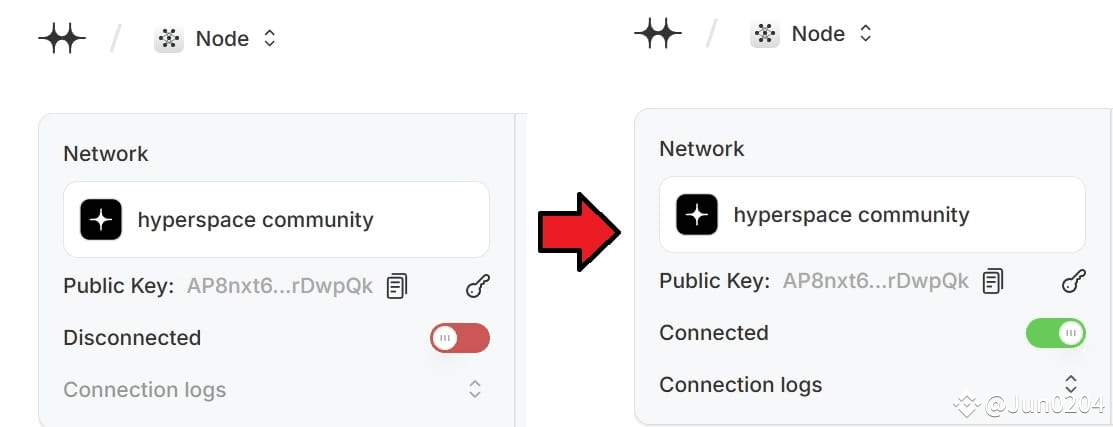
Start the node: Click the red button and it will switch to green, indicating that the node has been started.
Save private key: Click the key icon in the upper right corner to export and save your private key for future backup or recovery.
Check points: The page will show your points, online time and node level (Tier).
📌
It is recommended to keep the page open and ensure a stable network connection to continue accumulating points.
💻
Method 2: Desktop application (suitable for long-term operation)
Download the app: Go to https://hyper.space/downloads and download the corresponding version based on your operating system (Windows, macOS, Linux).
Install and launch: Launch the app after installation and the required models will be automatically downloaded.
Start the node: Click the red button and it will switch to green, indicating that the node has been started.
Save the private key: The private key archive is usually located in the following path:
Windows: C:\Users\<your user name>\AppData\Roaming\hyperspace\key.pem
macOS: /Users/<your username>/Library/Application Support/hyperspace/key.pem
📌
Do not delete the application folder, otherwise it may cause loss of private keys.
#HyperspaceAI is a decentralized AI computing network that allows users to run nodes through browsers, desktop applications or command line tools, contribute computing power and earn points, and may participate in airdrops in the future.
🧭
Method 1: Browser Node (suitable for beginners)
Visit the official website: Go to https://node.hyper.space.
Start the node: Click the red button and it will switch to green, indicating that the node has been started.
Save private key: Click the key icon in the upper right corner to export and save your private key for future backup or recovery.
Check points: The page will show your points, online time and node level (Tier).
📌
It is recommended to keep the page open and ensure a stable network connection to continue accumulating points.
💻
Method 2: Desktop application (suitable for long-term operation)
Download the app: Go to https://hyper.space/downloads and download the corresponding version based on your operating system (Windows, macOS, Linux).
Install and launch: Launch the app after installation and the required models will be automatically downloaded.
Start the node: Click the red button and it will switch to green, indicating that the node has been started.
Save the private key: The private key archive is usually located in the following path:
Windows: C:\Users\<your user name>\AppData\Roaming\hyperspace\key.pem
macOS: /Users/<your username>/Library/Application Support/hyperspace/key.pem
📌
Do not delete the application folder, otherwise it may cause loss of private keys.
🧭
Method 1: Browser Node (suitable for beginners)
Visit the official website: Go to https://node.hyper.space.
Start the node: Click the red button and it will switch to green, indicating that the node has been started.
Save private key: Click the key icon in the upper right corner to export and save your private key for future backup or recovery.
Check points: The page will show your points, online time and node level (Tier).
📌
It is recommended to keep the page open and ensure a stable network connection to continue accumulating points.
💻
Method 2: Desktop application (suitable for long-term operation)
Download the app: Go to https://hyper.space/downloads and download the corresponding version based on your operating system (Windows, macOS, Linux).
Install and launch: Launch the app after installation and the required models will be automatically downloaded.
Start the node: Click the red button and it will switch to green, indicating that the node has been started.
Save the private key: The private key archive is usually located in the following path:
Windows: C:\Users\<your user name>\AppData\Roaming\hyperspace\key.pem
macOS: /Users/<your username>/Library/Application Support/hyperspace/key.pem
📌
Do not delete the application folder, otherwise it may cause loss of private keys.
140
·
--
Sahara Labs (@SaharaLabsAI) has raised $43 million in funding, so their testnet interactions cannot be ignored.
Cost: $0
Reward Potential:
🌟🌟🌟🌟🌟
Steps:
1. Visit https://legends.saharalabs.ai/?code=ZP520Z
2. Click 'Login' and connect your EVM wallet.
3. Claim the faucet
👉
https://faucet.saharalabs.ai
After claiming the faucet, return to the homepage.
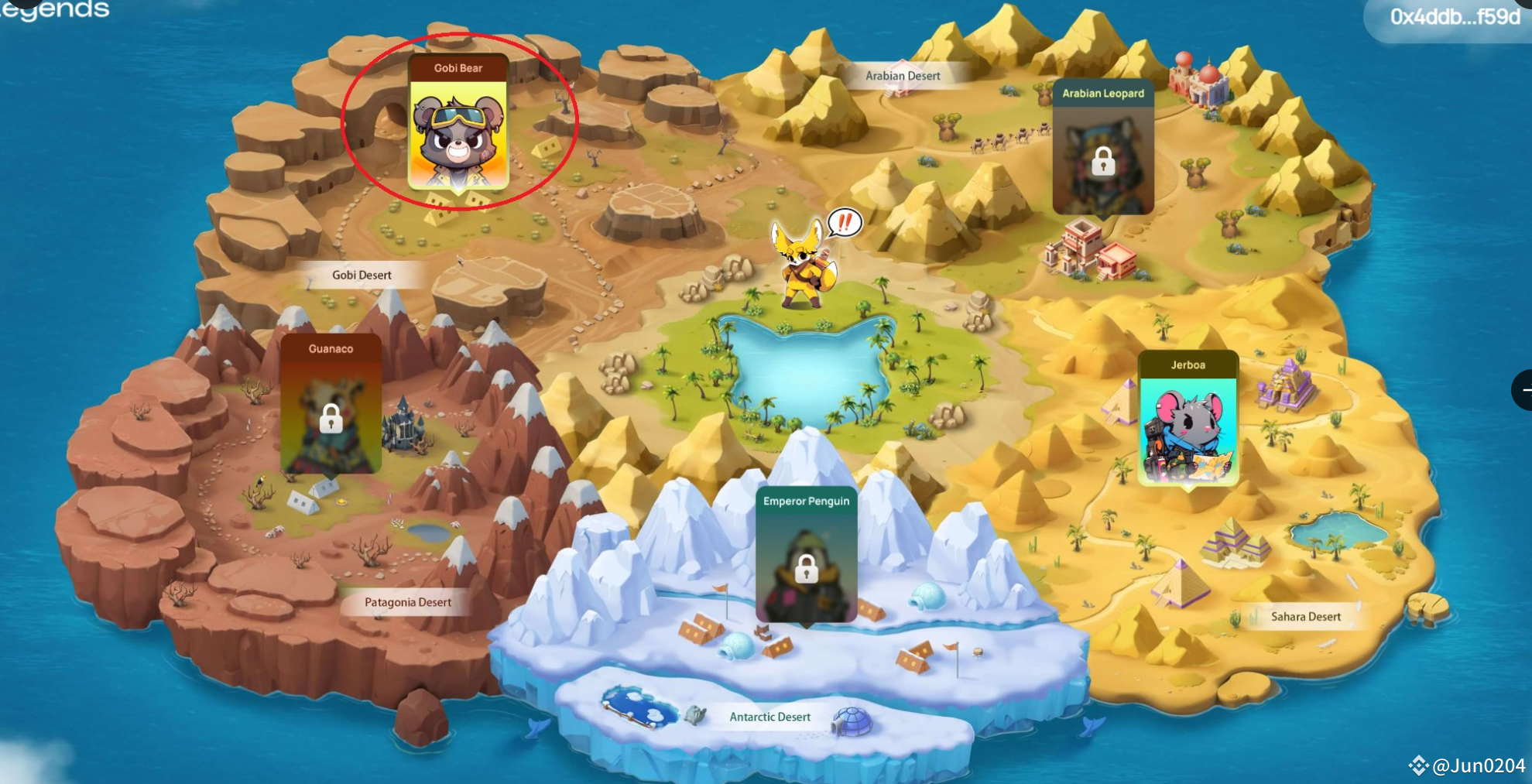
4. Click on GOBI BEAR to start the tasks.
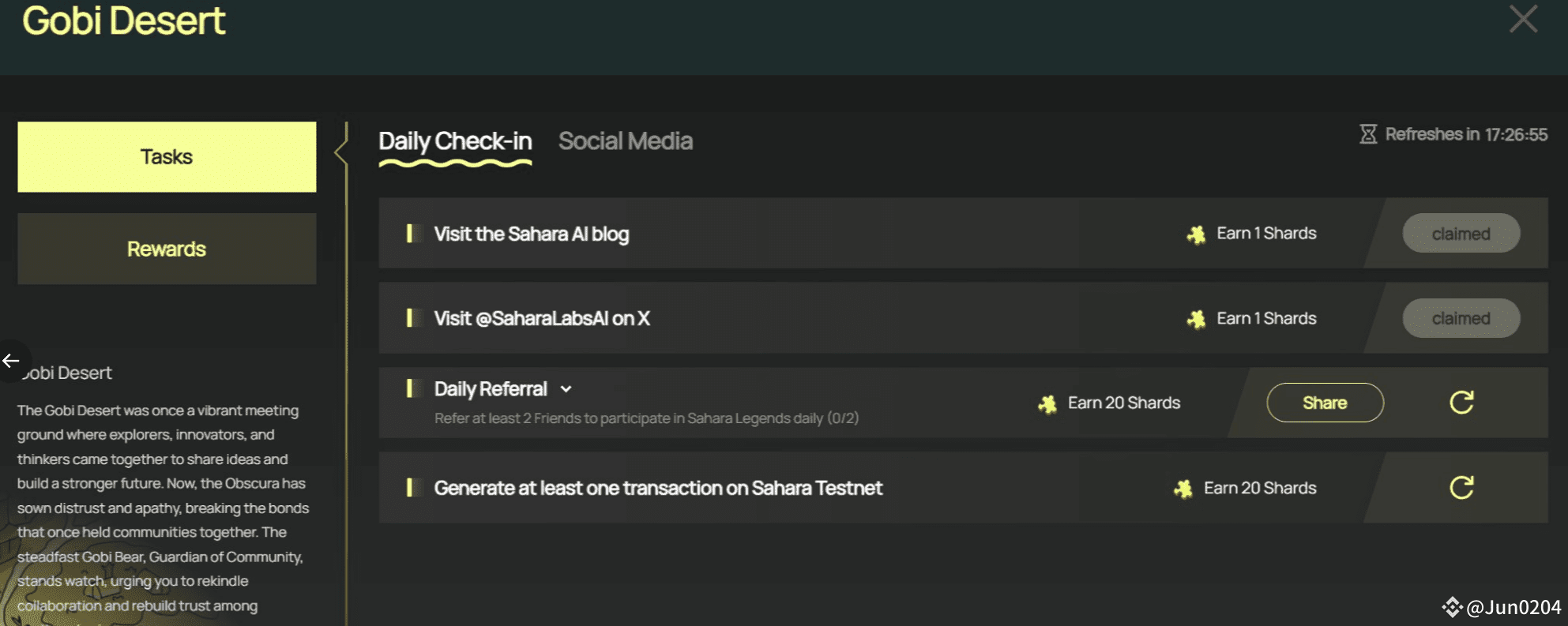
5. Complete 'Daily Check-In' and 'Social Media' interactions to earn fragments, claim fragments after completing tasks.
6. Testnet ERC 1155 NFT rewards will be available for claiming subsequently.
Sahara Labs (@SaharaLabsAI) has raised $43 million in funding, so their testnet interactions cannot be ignored.
Cost: $0
Reward Potential:
🌟🌟🌟🌟🌟
Steps:
1. Visit https://legends.saharalabs.ai/?code=ZP520Z
2. Click 'Login' and connect your EVM wallet.
3. Claim the faucet
👉
https://faucet.saharalabs.ai
After claiming the faucet, return to the homepage.
4. Click on GOBI BEAR to start the tasks.
5. Complete 'Daily Check-In' and 'Social Media' interactions to earn fragments, claim fragments after completing tasks.
6. Testnet ERC 1155 NFT rewards will be available for claiming subsequently.
Cost: $0
Reward Potential:
🌟🌟🌟🌟🌟
Steps:
1. Visit https://legends.saharalabs.ai/?code=ZP520Z
2. Click 'Login' and connect your EVM wallet.
3. Claim the faucet
👉
https://faucet.saharalabs.ai
After claiming the faucet, return to the homepage.
4. Click on GOBI BEAR to start the tasks.
5. Complete 'Daily Check-In' and 'Social Media' interactions to earn fragments, claim fragments after completing tasks.
6. Testnet ERC 1155 NFT rewards will be available for claiming subsequently.
197
·
--
#
Humanityprot has just announced big news. The new round of financing has exceeded the four major L2s and reached an astonishing 1.1 billion US dollars. If you haven’t participated yet, you can hurry up and make up for it!
The tutorial is as follows:
1. Log in to the website: http://testnet.humanity.org/login?ref=jun0204…
2. Link your wallet
3. Set ID and enter invitation code
4. Fill in your basic name and email address
5. Receive the verification code in your email and enter it on the website
6. Connect your social media
7. Collect your rewards daily
#
Humanityprot has just announced big news. The new round of financing has exceeded the four major L2s and reached an astonishing 1.1 billion US dollars. If you haven’t participated yet, you can hurry up and make up for it!
The tutorial is as follows:
1. Log in to the website: http://testnet.humanity.org/login?ref=jun0204…
2. Link your wallet
3. Set ID and enter invitation code
4. Fill in your basic name and email address
5. Receive the verification code in your email and enter it on the website
6. Connect your social media
7. Collect your rewards daily
Humanityprot has just announced big news. The new round of financing has exceeded the four major L2s and reached an astonishing 1.1 billion US dollars. If you haven’t participated yet, you can hurry up and make up for it!
The tutorial is as follows:
1. Log in to the website: http://testnet.humanity.org/login?ref=jun0204…
2. Link your wallet
3. Set ID and enter invitation code
4. Fill in your basic name and email address
5. Receive the verification code in your email and enter it on the website
6. Connect your social media
7. Collect your rewards daily
31
·
--
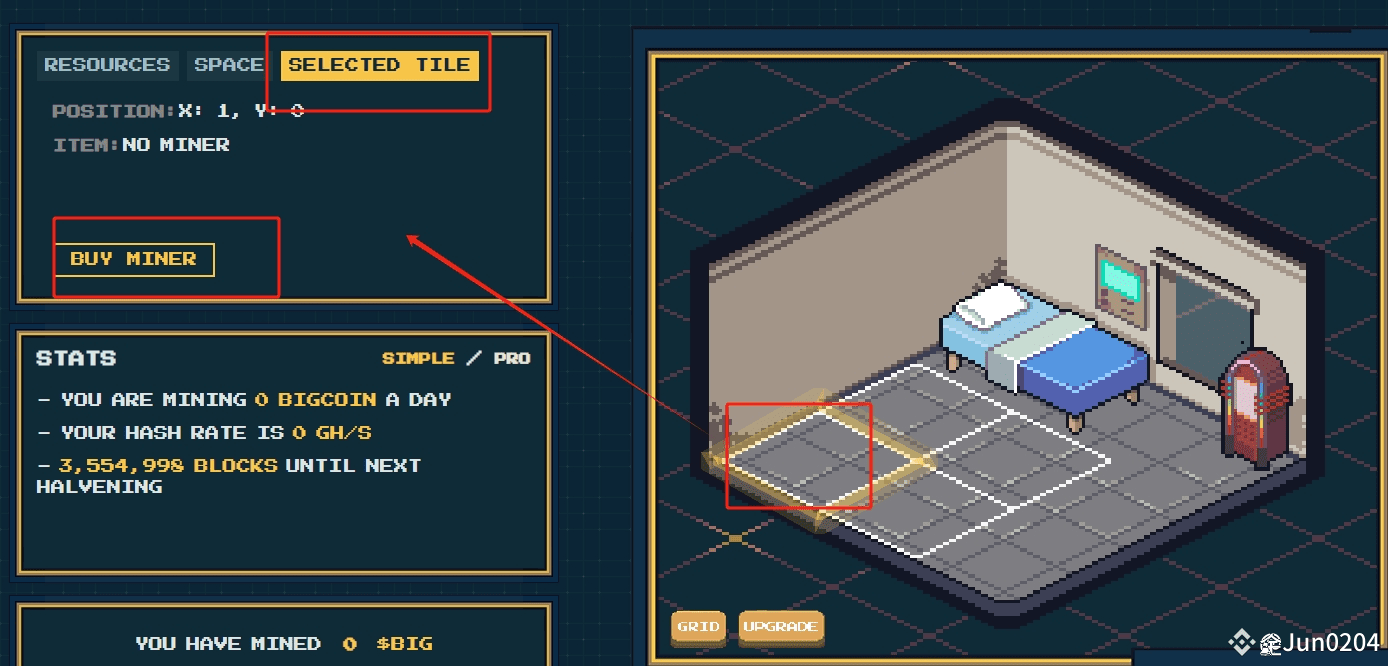
#satoshibigmoto is the trending #AbstractChain Defi these days. The gameplay is actually quite similar to previous Defis, with the difference being that the official ABS is now engaging with users, leading to a surge in user numbers and an increase in coin prices. It’s still early to join, and there may be opportunities to profit.
Gameplay Introduction:
1. Connect your wallet to log in: https://bigcoin.tech/?ref=0x8030f15b013AFAd389541CD093f1c7305e84C20A…
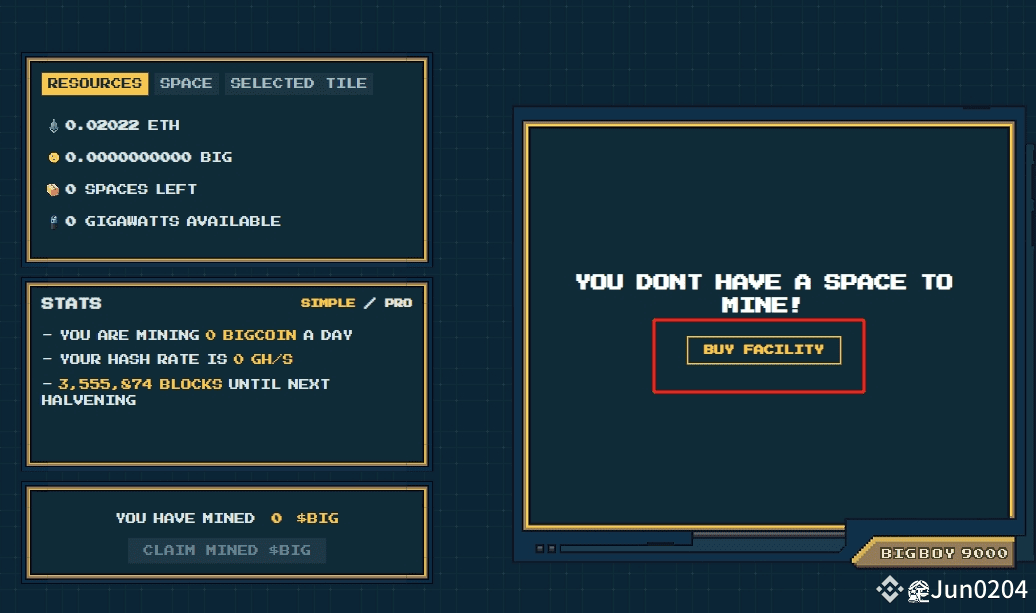
2. Click BUY FACILITY to purchase a room, the ETH required to buy a room seems to be variable.
3. The room will have four slots; randomly select one slot and click BUY MINER. After entering, you can see the types of miners available for purchase, their computing power, costs, etc. It is recommended to buy the first free miner to try it out. Of course, if you want to take a bigger chance, you can purchase a paid miner. One thing to note is that purchasing advanced miners may require upgrading the room as well; keep this in mind.
#satoshibigmoto is the trending #AbstractChain Defi these days. The gameplay is actually quite similar to previous Defis, with the difference being that the official ABS is now engaging with users, leading to a surge in user numbers and an increase in coin prices. It’s still early to join, and there may be opportunities to profit.
Gameplay Introduction:
1. Connect your wallet to log in: https://bigcoin.tech/?ref=0x8030f15b013AFAd389541CD093f1c7305e84C20A…
2. Click BUY FACILITY to purchase a room, the ETH required to buy a room seems to be variable.
3. The room will have four slots; randomly select one slot and click BUY MINER. After entering, you can see the types of miners available for purchase, their computing power, costs, etc. It is recommended to buy the first free miner to try it out. Of course, if you want to take a bigger chance, you can purchase a paid miner. One thing to note is that purchasing advanced miners may require upgrading the room as well; keep this in mind.
Gameplay Introduction:
1. Connect your wallet to log in: https://bigcoin.tech/?ref=0x8030f15b013AFAd389541CD093f1c7305e84C20A…
2. Click BUY FACILITY to purchase a room, the ETH required to buy a room seems to be variable.
3. The room will have four slots; randomly select one slot and click BUY MINER. After entering, you can see the types of miners available for purchase, their computing power, costs, etc. It is recommended to buy the first free miner to try it out. Of course, if you want to take a bigger chance, you can purchase a paid miner. One thing to note is that purchasing advanced miners may require upgrading the room as well; keep this in mind.
604
Log in to explore more content
Join global crypto users on Binance Square
⚡️ Get latest and useful information about crypto.
💬 Trusted by the world’s largest crypto exchange.
👍 Discover real insights from verified creators.
Email / Phone number
Trending Topics
USAugustPPIRisesLessThanExpected
5,156 views
200 Discussing
🚨 US AUG PPI: Rises LESS Than Expected! Bullish for Crypto? 🚀
PPI +0.4% MoM as expected, but CORE PPI only +0.2% vs +0.3% expected - cooling!
What it means:
• Wholesale inflation softer than feared
• Fed rate hike chance now 62% - but dovish signals coming
• Core PCE revisions expected downward - bullish
• BTC usually pumps on softer PPI
Fed meeting Sep 15-16 - Market now expects pause, not hike?
Is this the green light for Q4 rally?
#Bitcoin #PPI #Fed #CryptoNews #BTC#usaugustppiriseslessthanexpected
True News
·1 Likes
·1k views
SECApprovesNasdaqTexasCommodityTrustRule
5,171 views
227 Discussing
ECBRaisesRatesSecondTimeTo2.5%
2,759 views
163 Discussing