


Oisy Wallet is a browser-based multi-chain crypto wallet maintained by the DFINITY Foundation that allows users to send and store cryptocurrencies and connect to decentralized applications (dapps) directly from the browser.
User experience improvements
The browser-based wallet introduces several key usability improvements:
Oisy wallet users do not need to download any plugins or apps and can be easily accessed across different devices;
Cryptocurrency holders with accessibility needs can choose to access browser-based wallets on desktop for easier navigation;
Powered by Internet Identity, instead of logging in with a password, users can log in with a key, such as FaceID or TouchID, for a more secure and seamless sign-in.
Users who value anonymity further can use Oisy on an invisible browser.
Completely on-chain
For users who are keen on decentralization, Oisy Wallet is completely on-chain, and Oisy Wallet full-stack applications are securely deployed on the chain.
Additionally, wallet keys are generated and secured on the ICP network, using chain key technology, and keys are generated using advanced cryptography and distributed among dedicated ICP nodes.
Therefore, to generate a signature, each node must agree to sign the message and coordinate with each other to sign the complete message. This concept of chain-key signatures is called threshold ECDSA.
Note: Oisy wallet is still in alpha stage, please use it at your own risk.
Tutorial on setting up Oisy wallet (three steps)
Step 1: Navigate to the Oisy wallet homepage oisy.com;

Step 2: Click the "Connect using Internet Identity" button to start the login process;
Internet Identity is an out-of-the-box, chain-agnostic, decentralized authentication framework that any dapp can integrate with, which enables users to authenticate dapps using keys such as FaceID or TouchID.
Oisy Wallet uses Internet Identity to allow users to abandon passwords and log in entirely using keys.

Step 3: Follow Internet Identity Steps
You can also refer to the complete steps listed in the Internet Identity documentation:
internetcomputer.org/docs/current/tutorials/developer-journey/level-3/3.5-identities-and-auth#creating-an-internet-identity
Select New from the user interface.

Next, select Create Key.

When prompted, choose how to create the key on your current device, or use another device.

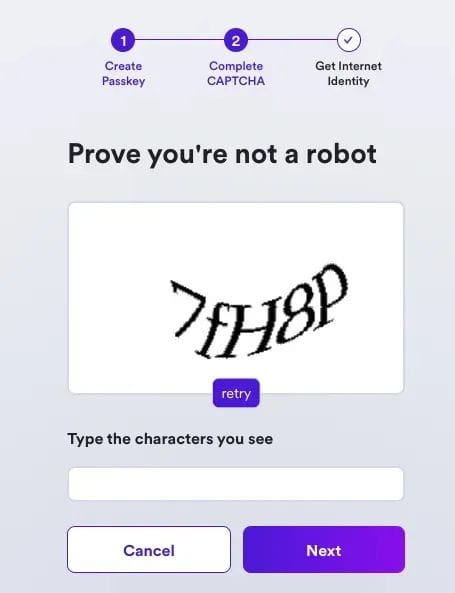
Then, enter the verification code to continue.
Your internet identity has been created, it will appear on the screen and you are advised to write it down and save it in a safe location.
After saving, select the "I Saved, Continue" button.

NOTE: After you have tested Oisy Wallet we recommend that you consider setting up a recovery method, either a recovery phrase or a device, please refer to this document to set a recovery phrase:
identitysupport.dfinity.org/hc/en-us/articles/15431447735700-How-do-I-create-a-recovery-phrase
After selecting the "I Saved, Continue" button, please wait a few seconds for your wallet to be generated.

Congratulations, your wallet has been generated.
After generating the wallet, this popup will appear.

Click the "Let's Go" button to redirect to the Oisy wallet main interface:

Note: While ECDSA keys are compatible with sending tokens across various EVM chains, it is worth noting that the Oisy Wallet web interface currently only supports transactions on the Ethereum network.
Receive cryptocurrency
On the main interface, click the "Receive" button to view your Ethereum wallet address.

You can manually send cryptocurrencies from an exchange or alternative wallet using your wallet address.
You can also click the "Receive from Metamask" button to initiate a transaction sending 0.05 ETH, making sure you are on the Ethereum mainnet network in Metamask.
Send cryptocurrency
On the main interface, you will see a list of tokens.
Make sure you have added the tokens you want to send in your Oisy wallet, select the token you want to send or click "Add New Token" to send a different Ethereum token.
Once you click on the token you will see the "Send" button, click on the "Send" button.

Add the destination address and the amount of tokens you want to send.

Please note the gas fee you will pay for transaction fees.
Click Next to view the transaction.

Click Send to confirm and send the transaction.
Connect to dapp
Oisy is integrated with the WalletConnect protocol, allowing you to use Oisy as a wallet on any dapp integrated with WalletConnect.
For example, to connect to the Oisy wallet on Uniswap, click the Connect button on Uniswap.
Select WalletConnect as an option.

In the Desktop section, click See all, and in the search bar, search for "Oisy Wallet."

Click the “Oisy Wallet” icon that appears, and the Uniswap page will not indicate that a login attempt for the Oisy Wallet has begun:

Another tab will appear redirecting you to the Oisy Wallet page and injecting the Wallet Connect URI into the URL. You will notice that the URL for the Oisy Wallet page in the address bar will have a similar format:
https://oisy.com/wc/?uri=wc%3Ab25133f262084bf6493a422ebd37ffb9d789270cee53a4cf3136c4dbda6b4ae2%402%3Frelay-protocol%3Dirn%26symKey%3D65d922b3754f58ed976ac3010fb59eaa3de5dbc86d1dddee6f7fc191784faff2
In this new tab, Oisy Wallet will ask you to approve or deny the connection, click on the "Approve" button.

You should now connect to Uniswap using the same wallet address as in your Oisy wallet.

reference
Check out this video of DFINITY Foundation CTO Jan Camenisch and VP of Development Lomesh Dutta introducing Oisy Wallet
Oisy wallet source code: github.com/dfinity/oisy-wallet

IC content you care about
Technology Progress | Project Information | Global Events

Collect and follow IC Binance Channel
Stay up to date with the latest information