

Introduction
In this article, we will introduce the BEP-20 token standard, show you how to withdraw BEP-20 tokens to save time and fees, and share a list of exchanges that support direct BEP-20 withdrawal.
What is BEP-20?
BEP-20 is a BNB Smart Chain (formerly Binance Smart Chain) token standard that extends the functionality of ERC-20 and BEP-2 tokens by allowing them to be transferred between different blockchains.
With the BEP-20 standard you can:
use tokens compatible with various blockchains;
link tokens of other blockchains and make them available on BNB Chain (wrapped tokens, for example BTCB);
exchange BEP-2 tokens for equivalent ones in BEP-20 (transfer BNB from BEP-2 to BEP-20);
pay very low transaction fees with a block time of 3 seconds;
For a more detailed look at the BEP-20 standard, check out the project on Github.
How to withdraw BEP-20 tokens
Dozens of exchanges support BEP-20 withdrawals to BSC-compatible wallets. This saves you from having to manually convert BEP-2 tokens to BEP-20. By withdrawing BEP-20 tokens directly, you save time and money (commission costs) by skipping the step of converting tokens into BEP-20.
Before making a withdrawal, make sure your exchange or wallet supports BEP-20 tokens. If you are unsure, please contact our official customer service.
Withdrawal of BEP-20 tokens from Binance.com
In this article, we will demonstrate the process of withdrawing BNB from Binance.com to Trust Wallet. The withdrawal process is approximately the same on all crypto exchanges and in all wallets.
Before you begin, you must go to your Trust Wallet (or any other BSC-compatible wallet) and find out the recipient's BSC address. It's very simple: you just need to open your wallet, select Smart Chain and click the "Receive" button. The address will appear on the screen. Save it as you will need it in step#3of this guide.
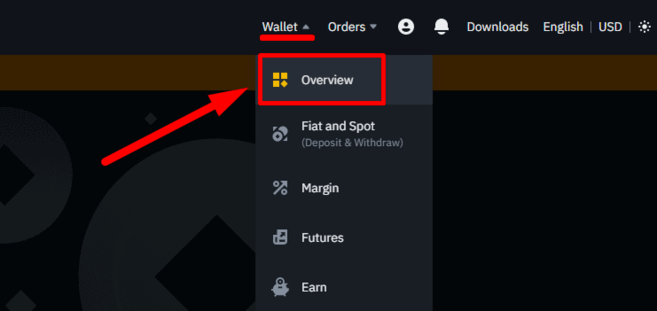
1. Log in to your Binance.com account. In the top right corner, select "Wallet" and click "Browse."
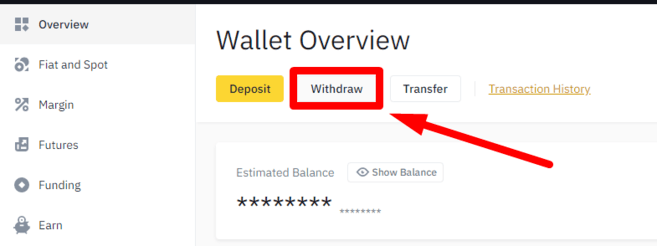
2. On the wallet page, click “Withdraw”.
3. Once you go to the withdrawal menu, select the coin you want to withdraw (BNB in our case), enter the withdrawal address (obtained from Trust Wallet), select BNB Smart Chain (BEP20) as the transfer network and enter the amount you want to withdraw.
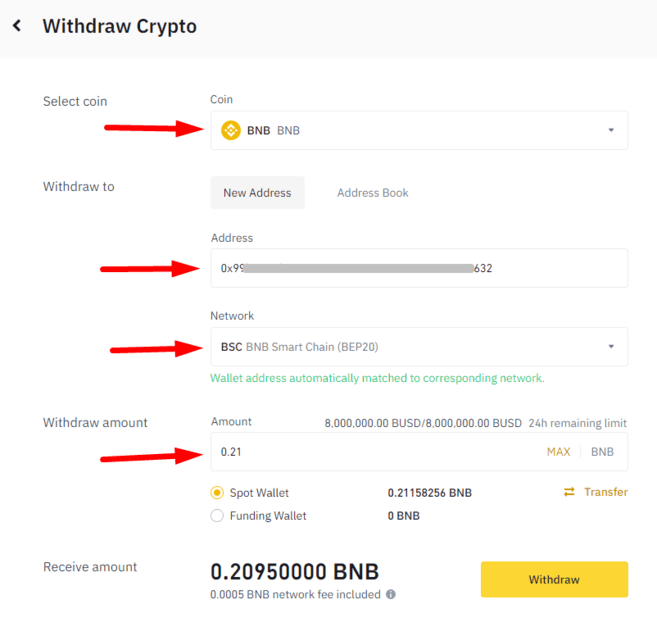
4. After selecting BNB Smart Chain as the transfer network, a pop-up window will appear. It is necessary to confirm your actions.

5. The next steps are the same as for any other withdrawal. A confirmation screen will appear with transaction details such as the conversion rate and fees.
6. Once confirmed, you will be asked to enter a verification code to confirm your withdrawal.
Your transaction will be processed shortly. Funds should appear in your Trust Wallet within minutes of receiving your withdrawal confirmation email. Once the funds arrive, Trust Wallet will send you a notification that your BNB BEP-20 tokens have been successfully deposited.
If you follow these instructions, you won't have to manually convert BEP-2 tokens to BEP-20. Once you receive your transfer in Trust Wallet, you will be able to immediately interact with any compatible DApp or project.