

While surfing online, there is a risk of infecting your computer with a hidden miner virus. He can independently use a PC or laptop to mine cryptocurrency. Moreover, an antivirus is not always effective against such a program, and it can be difficult to get rid of it.

What is a hidden mining virus
Malicious miners belong to the Trojan group of viruses. They quietly penetrate the Windows system and begin to use the hardware resources of a computer or laptop to mine cryptocurrency.
As soon as the user has discovered that such mining is being carried out from his PC, it is necessary to immediately get rid of the malicious program.
Why is a virus miner dangerous for a PC?
If the Trojan is in the Windows system, then using a computer or laptop becomes unsafe. Any passwords can be calculated, and data can be deleted or stolen.
If this is a Trojan for mining, then it also negatively affects the video card and processor. Working on an overloaded PC becomes uncomfortable. In addition, hidden mining leads to accelerated wear and tear of equipment.
Laptops are especially sensitive to such loads. They can fail after just a few hours of background mining. That's why you need to get rid of hidden programs as soon as possible.
Types of hidden viruses for mining
Mining viruses can be divided into two main groups.
Hidden cryptojacking
Such a virus is not downloaded onto a PC or laptop, but exists in the form of an online script built into the website.
When a user lands on an infected page, the script is activated and the resources of the computer or laptop begin to be used for cryptocurrency mining. And since the mining program is built into the site, the antivirus cannot remove it.
You can detect that a malicious script has started working against your computer by increased CPU load.
Classic mining virus
This virus looks like an archive or file. It is installed unnoticed, against the user's wishes. If you do not remove it, it will start every time you turn on the computer.
As a rule, such a program has only one function - to use a PC to mine cryptocurrency. But sometimes you can “catch” a hidden virus that checks the user’s wallets and transfers his funds to the hacker’s accounts.
How to understand that your PC is infected
To remove a miner virus, it must be recognized. Check your computer with an antivirus and search for infected files if the following symptoms are found:
Video card overload. This problem can be recognized by external signs: the GPU begins to make a lot of noise (due to intense rotation of the cooler) and becomes hot to the touch. You can also determine the load using the free GPU-Z program.
Slow PC. When your computer or laptop slows down, you need to check the processor load through the task manager. If this indicator is 60% or more, then the Windows system may be infected with a miner virus.
Increased RAM consumption. The hidden miner uses all available computer resources, including RAM.
Deleting files, information or settings against the user's wishes and without his approval.
Increased consumption of online traffic. The hidden miner is constantly active. And sometimes Trojans can be part of a botnet - a hacker network that is used to carry out DDOS attacks against external systems.
Browser performance slows down. When searching and visiting sites, the online connection is disconnected or tabs are deleted.
Task Manager finds processes with unfamiliar names, such as "asikadl.exe".
How to find and remove a hidden miner virus
If at least one of the described symptoms is detected, you need to scan your Windows system with an antivirus. It helps fight against malicious software and remove it.
After checking with an antivirus, you should run the CCleaner program or its equivalent. It finds and removes from the Windows system all the garbage that works against it. To complete the uninstallation process, you need to restart your computer.
Sometimes mining viruses appear that can add themselves to the list of trusted programs. Then the antivirus will not be able to find and delete them.
Also, new miners can detect the task manager and shut down before it appears on the screen. But in any case, you need to check all processes.
Manually searching for a hidden miner
To manually check your computer, open the registry:
Press the Win+R key combination.
In the window that appears, enter the word regedit.
Click OK.

In the registry that opens, you can detect a suspicious process.
To check you need:
press Ctrl+F;
enter the name of the malicious task in the search bar;
click the “Find” button.
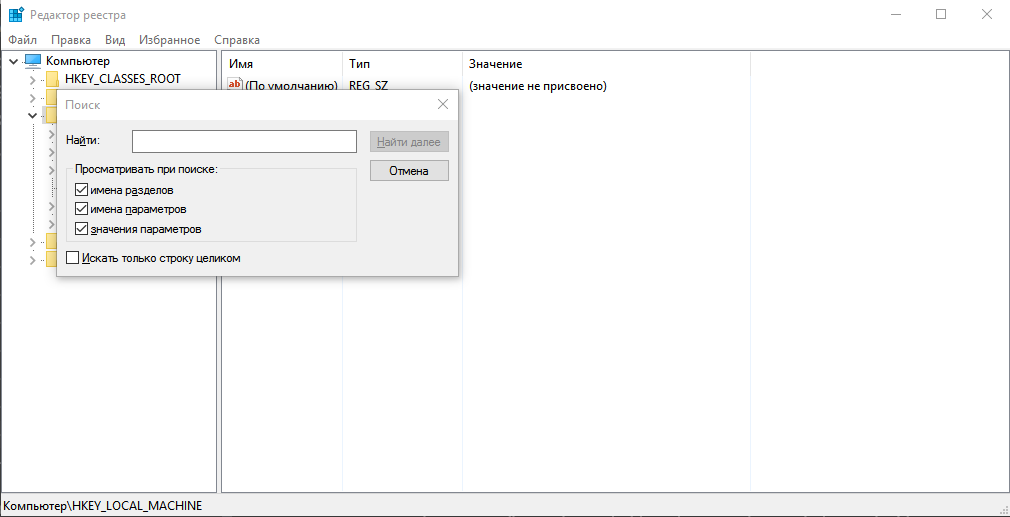
This way you can detect processes that are consuming resources. They often have names in the form of a random set of characters.
After this, you need to get rid of all suspicious entries found and restart the computer. If hidden mining is detected again, it means that it was not possible to get rid of the virus and you need to check your computer in other ways.
Finding a hidden miner through the task scheduler
To calculate hidden mining through the scheduler in Windows 10:
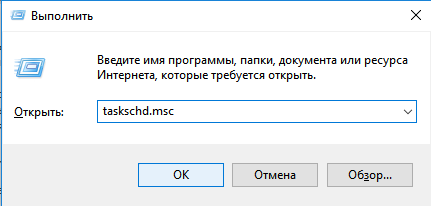
press Win+R;
enter taskschd.msc in the “Open” field;
Click OK.
In the Task Scheduler window, you need to find and open the “Task Scheduler Library” folder. It will contain processes that load automatically. If you click on any of them, information about the task will be displayed at the bottom of the window.
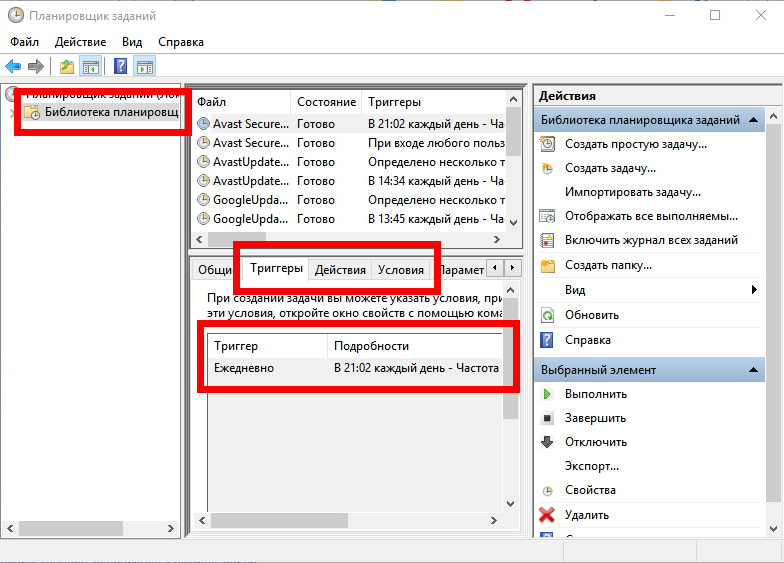
Here you need to check the “Triggers” and “Actions” tabs:
“Triggers” specifies when and how often the process runs. Pay attention to those that are activated every time you turn on the PC.
In the “Terms” you can find information about what exactly this process is responsible for: for example, for detecting and downloading a specific program.
Suspicious processes must be removed. To do this, right-click on the task name and select “Disable”. In this case, the mining virus is not removed, but it will not be able to work fully.
After stopping suspicious tasks, you need to check the processor load. If it starts working normally, then the found programs need to be removed from startup. Removing is performed in the same way as disabling, you just need to click on the “Delete” item.
You can check startup more thoroughly using the free AnVir Task Manager program. It searches for and checks tasks that run automatically.
To detect and remove more complex malicious software, you need to download an antivirus, for example the Dr. program. Web. It performs a deep scan of the Windows system. Through its interface, you can get rid of any suspicious files and processes (not only hidden mining).
Before removing the virus, it is better to create a backup to restore the system.
Protecting your computer from mining viruses
The following recommendations will help protect your PC:
Install an image of a clean and tested Windows system on your PC. If signs of infection by a hidden miner are detected, you need to start the recovery process. This can be done every 2-3 months.
Install an antivirus. It is important to regularly update anti-virus databases.
Don't forget to check information about programs before downloading them. This way you can detect a mining virus before it reaches your PC.
Scan all downloaded files with an antivirus and if a virus is detected, delete it. This way you can get rid of hidden mining programs that have already been downloaded but not yet launched.
Work online with antivirus and firewall enabled. If the software detects a dangerous site, it is better to close it.
Add dangerous sites to your hosts file. To do this, you can use lists from the GitHub portal. It has a section with information for detecting browser mining. There are also instructions on how to protect yourself from viruses.
Do not perform actions as an administrator. If you run a miner program in this way, it will gain maximum access to PC resources and it will be very difficult to get rid of it.
Allow only trusted programs to run. For this purpose, Windows has the secpol.msc utility. Here you can create a policy for reviewing and restricting the use of software.
Set permission to use only certain ports. The corresponding settings are located in the antivirus and firewall menu.
Set a strong password on your router and disable password detection and remote online access.
Prevent other users from searching and installing programs.
Set a password for the Windows system to prevent unauthorized use of your PC.
Do not access dubious sites without online certificates. Secure resources can be identified by the ssl (https) icon.
Block JavaScript script codes found in your browser settings. This way you can remove the possibility of running malicious code that connects online through a browser. In this case, moving elements of sites will also no longer be detected and displayed correctly.
Enable mining detection and protection in the Chrome browser. This can be done in the settings under “Privacy and Security”.
As an additional security measure, you can install filters for searching and removing advertising banners - AdBlock, uBlock and others.