

TL;DR
The process of withdrawing funds on Binance depends on the cryptocurrency or fiat currency you want to move. Some cryptocurrencies can be withdrawn to multiple blockchains. Therefore, be careful when selecting the correct network.
The time required to withdraw funds varies depending on the method selected. For cryptocurrency withdrawals, each blockchain will require a certain amount of confirmations before completing the sending to your wallet. You can check the status of your transaction using the respective blockchain explorer.
From time to time, Binance may suspend withdrawal functions for technical updates. Binance will inform users when this is the case. If your withdrawal operations are taking a long time, after checking the possible causes, you can contact Binance customer support.
Introduction
If you want to transfer funds from your Binance account, you must complete the withdrawal process. The withdrawal process varies depending on the blockchain, cryptocurrency or fiat currency. Generally, it is a very simple process. But be careful and follow each step to avoid losses.
How to withdraw cryptocurrencies from Binance
In this example, we will withdraw BNB to Trust Wallet and explain each step of the process.
1. Login to your Binance account. Go to [Wallet] and click on [Fiat and Spot].

2. Click [Withdraw].

3. Select the [Cryptocurrency] tab and choose the cryptocurrency you want to withdraw.
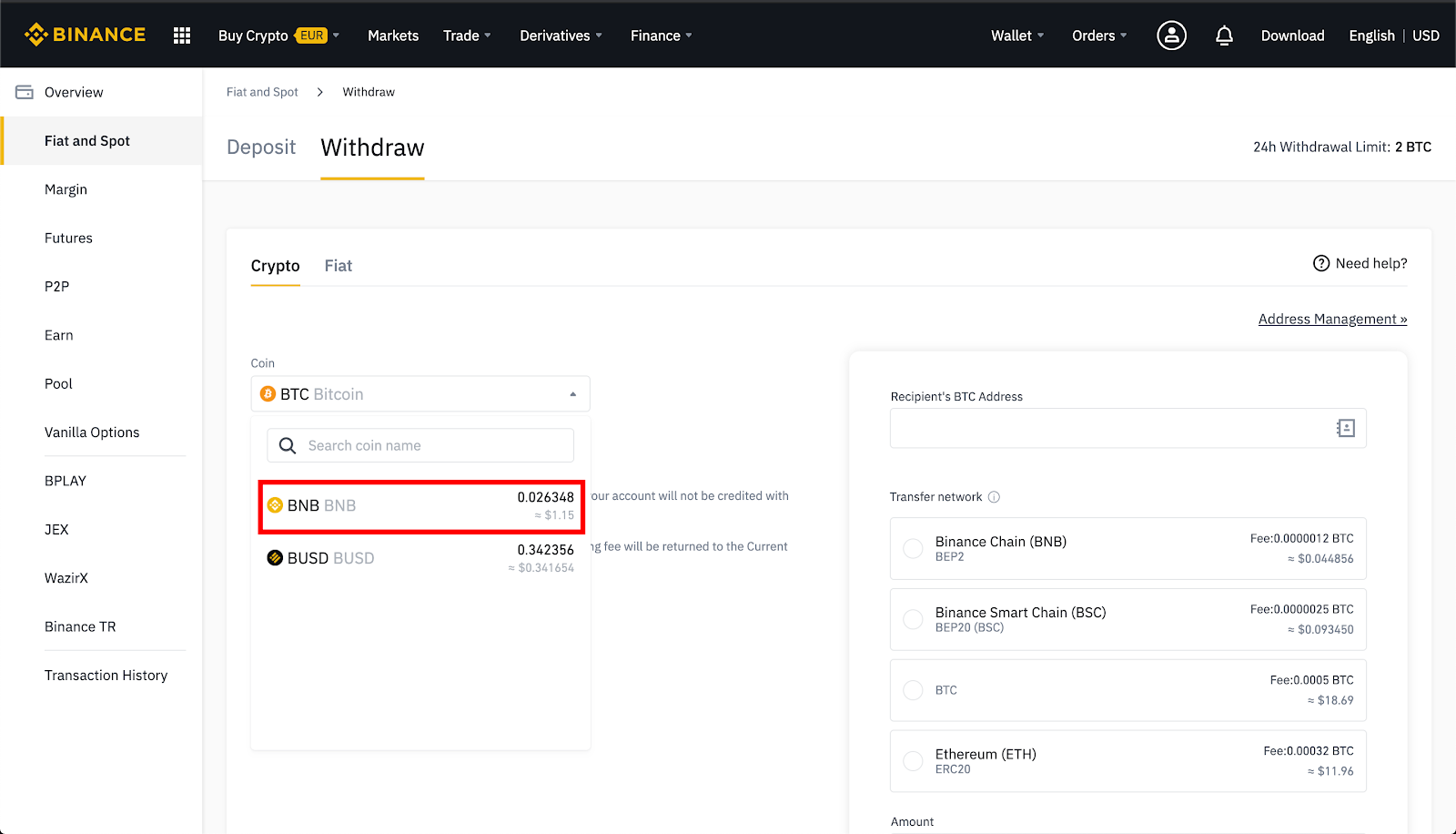
4. If the cryptocurrency is issued on several networks, select the network to which you want to make the withdrawal.
For example, BNB is issued on Binance Chain as a BEP-2 token and on Binance Smart Chain (BSC) as a BEP-20 token. Therefore, if you want to make a withdrawal to a BEP-2 wallet address, select the BEP-2 option. Be very careful with this step. If you withdraw to the wrong address, you may lose all of your crypto assets.

5. Select BNB in your Trust Wallet.

6. Select [Receive].

7. Copy your BNB address.

8. Paste it into [Recipient's BNB Address] on the Binance withdrawal page. Check that everything is ok and select [Send].
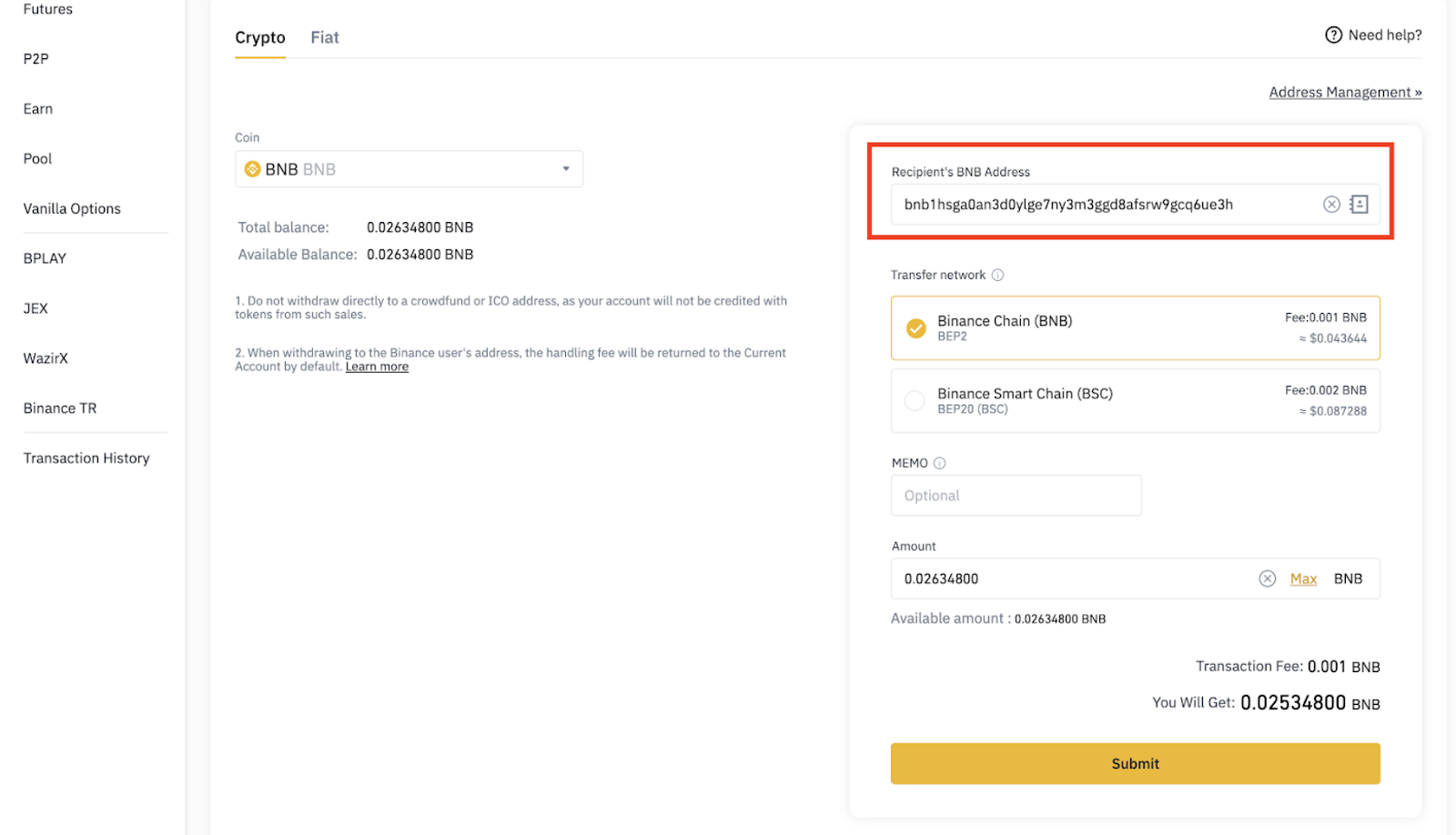
9. Click [Send Code] and enter the 6-digit code you received via email.
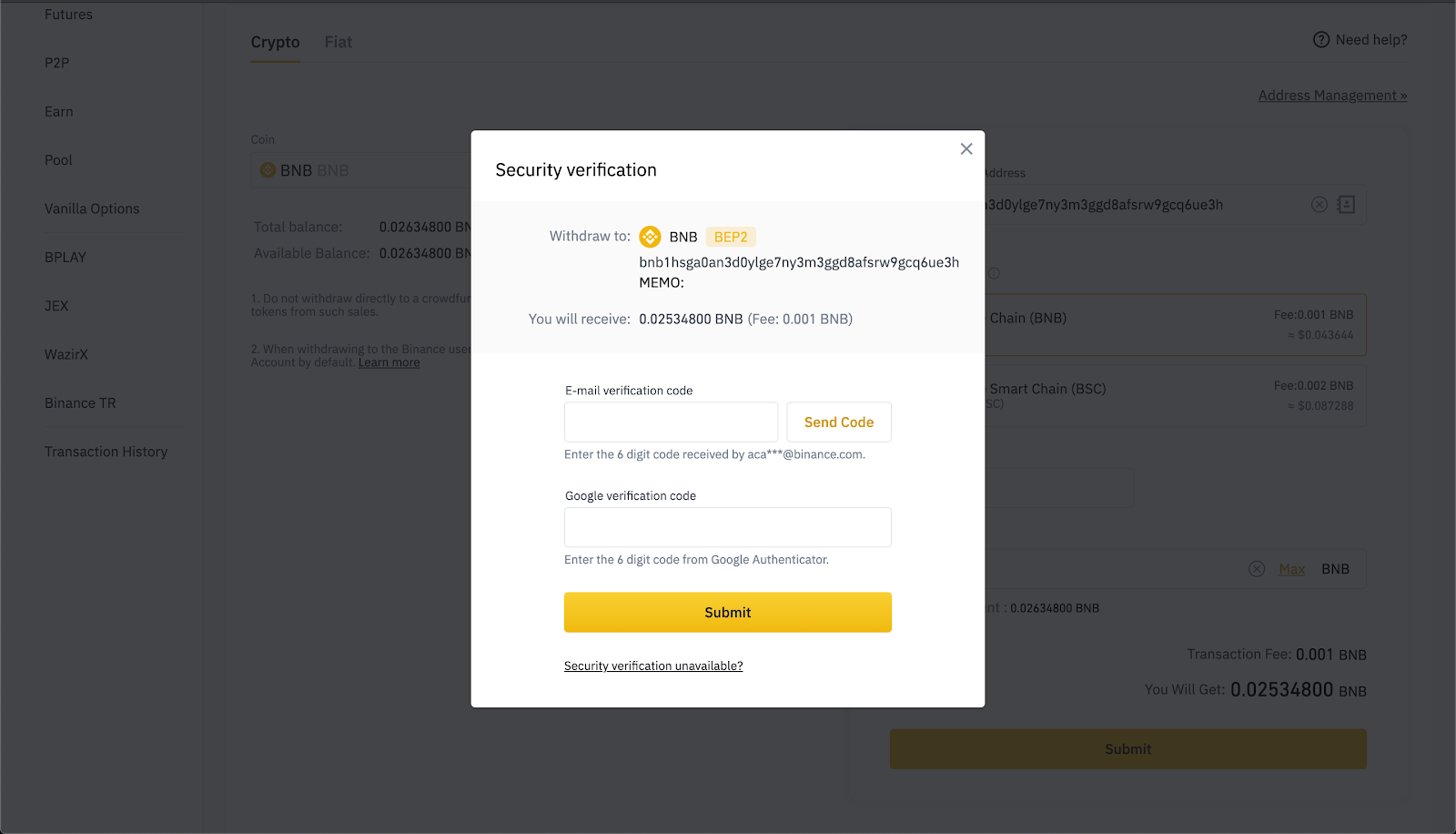
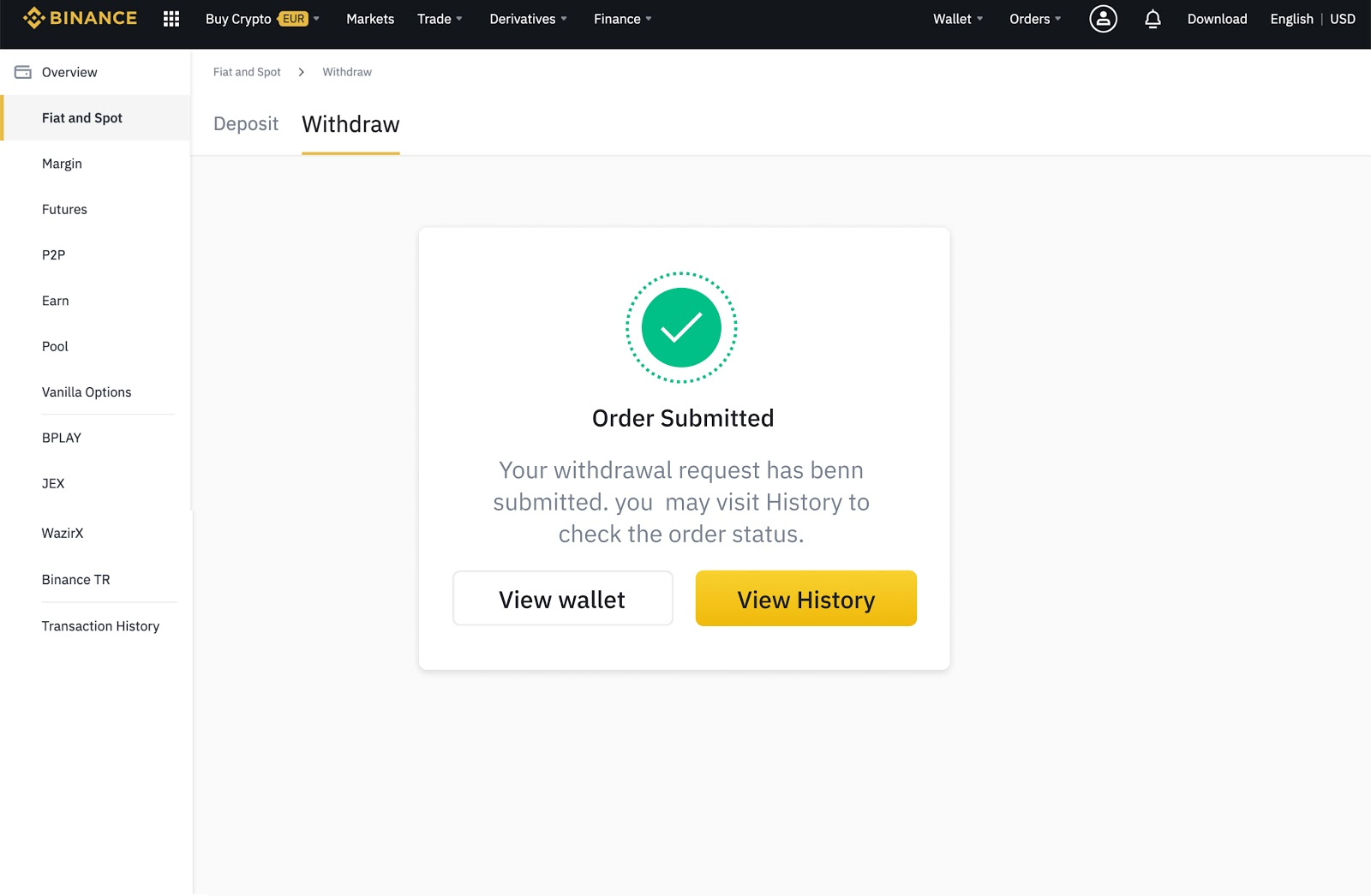
10. Enter your 2FA code. Check that everything is ok and select [Send]. You can check the progress of your withdrawals in Transaction history.
How to withdraw fiat currency from Binance
Binance supports over 60 fiat currencies and many different payment methods.
1. Login to your Binance account. Go to [Wallet] and click on [Fiat and Spot].

2. Click [Withdraw].

3. Select the [Fiat] tab - fiat currency.

4. Select the currency you want to withdraw and the payment method. Available payment methods are based on the user's selected currency and region.
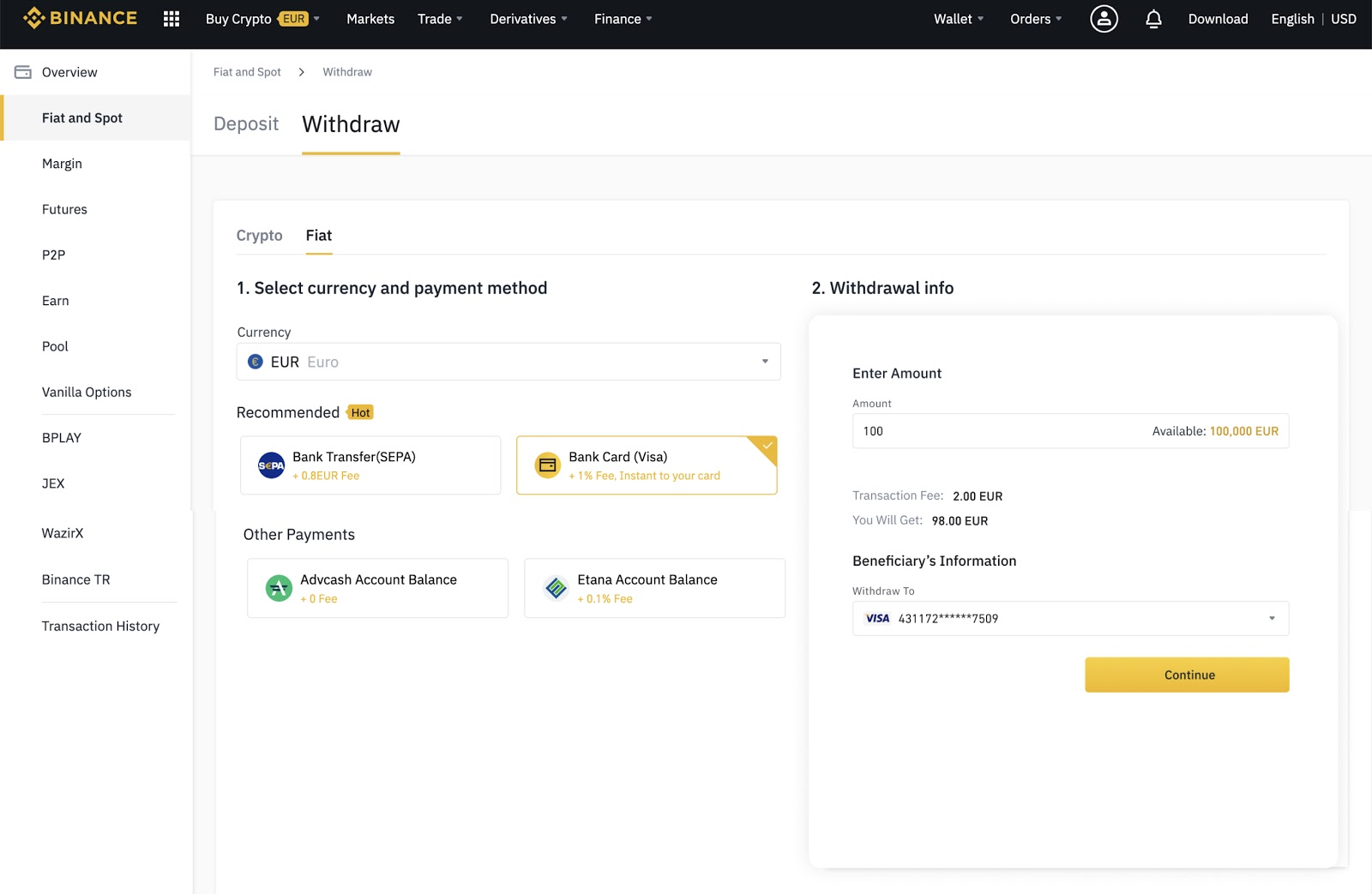
5. Enter the requested information and follow the instructions.

6. Enter your verification code to confirm the withdrawal.

What are cryptocurrency withdrawal fees?
Cryptocurrency withdrawals from your Binance account are subject to fees to cover the cost of network transactions. For example, withdrawing BNB or Ether (ETH) requires Binance to send cryptocurrencies to a cryptocurrency wallet on a different blockchain.
In other words, any transaction on Binance Smart Chain, Binance Chain or Ethereum requires a Gas fee that the user must pay to miners. Binance passes the cost of this transaction fee on to the user.
Each blockchain has its own fee schedule, so cryptocurrency withdrawal fees vary by currency. Additionally, fees are dynamic and vary depending on network activity. The best and most accurate way to check the withdrawal rate is by consulting the withdrawal page itself.
What is the minimum withdrawal amount on Binance?
Each cryptocurrency has a minimum withdrawal amount. It is not possible to withdraw an amount lower than that indicated on the withdrawal page. You can see a list of all minimum amounts and withdrawal fees by visiting the Withdrawal and Deposit Fees page.
How long does it take to make a withdrawal on Binance?
Binance will process your withdrawal transaction as soon as requested, but each blockchain has different confirmation times for transactions. Bitcoin (BTC) can take around 10 to 30 minutes to confirm a withdrawal operation. Withdrawals from Binance Smart Chain usually only take a few minutes. On Ethereum, the waiting period may be a little longer. The more congested the network, the longer the waiting time.
Why is my Binance withdrawal process stuck?
Your transaction may be stuck because the blockchain has yet to confirm your transaction or because the network is congested. As we mentioned before, some blockchains need more network confirmations than others. During periods of heavy traffic, transactions may take much longer than expected.
Why can't I withdraw from Binance?
If you are unable to make a withdrawal, there are a few possible reasons. If you have recently changed your password or disabled SMS/Google authentication, Binance will suspend withdrawal functions for 24 hours. If you perform a full reset of your authentication via SMS/Google, Binance will suspend withdrawal functions for 48 hours.
If Binance detects any suspicious activity on your account, the withdrawal function will be temporarily suspended. This interruption is to protect your account and funds. Additionally, Binance occasionally implements system updates that require stopping withdrawal functions until the update is complete.
What to do if my Binance withdrawal is not credited?
Check for congestion on the blockchain network. If this is not the case and the withdrawal amount is still not credited, please contact the Binance support team for assistance. If you are withdrawing fiat currencies to your bank, the process may take a few days.

Final considerations
Withdrawing your cryptocurrencies from Binance is a simple process that typically goes smoothly. If you want to withdraw fiat currencies or move cryptocurrencies, you will find all the necessary information on the withdrawal page. If you're having trouble, check your emails and see if Binance has suspended your withdrawals for any reason. You can also consult a blockchain explorer to check the level of network congestion. Either way, it's important to be patient. Most of the time, problems are temporary. If you're still having issues, the Binance support team will be happy to help.